Resuleet Copilot is live on the Chrome Web Store
A milestone worth celebrating: save the job you're reading, see how it fits your experience, and bring it into Resuleet for review. Meet our Chrome extension.
By The Resuleet team
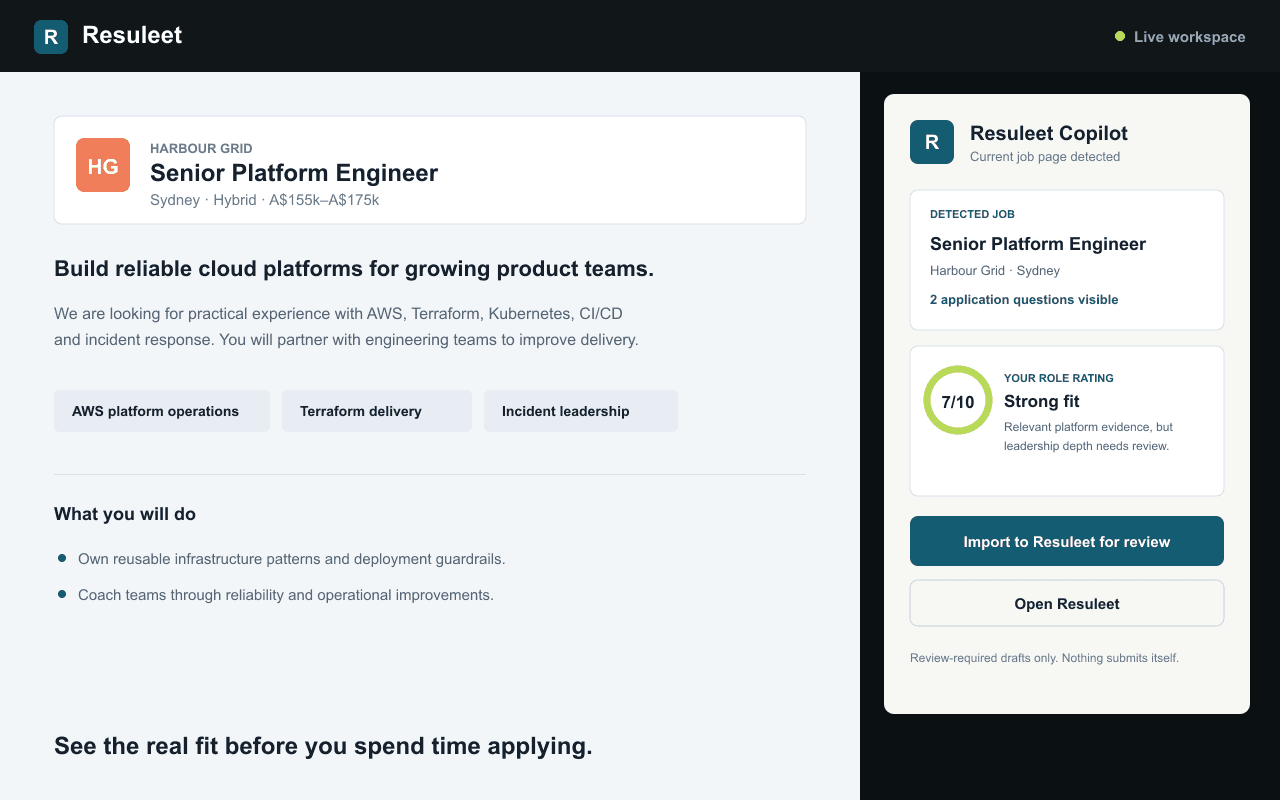
It's official: Resuleet Copilot is available on the Chrome Web Store. Today we're celebrating a small extension with a very practical purpose: helping you keep a promising job from becoming another forgotten browser tab.
Finding a role is only the beginning. Next comes copying the details, checking the requirements, remembering the deadline and deciding whether the opportunity is actually right for you. We built Copilot to make that first stretch of the job search less repetitive, while keeping the decisions yours.
From a job page to your next opportunity
Open a job listing and click Resuleet Copilot. The extension reads available information from the current page: the role title, company, location, salary, work mode, closing date, description and visible application questions.
Choose Import to Resuleet for review to bring those details into a draft. Check the fields, fill any gaps and save the role to your tracker. The listing stays connected to its source, so you can return to the original page when you're ready.
Pages vary, and extraction won't always be complete. Copilot does not bypass login barriers or CAPTCHAs. If a page isn't supported, you can still paste the job description into Resuleet, or try URL import for an accessible public listing.
A role rating with a reason, not just a number
Connect Copilot to your Resuleet candidate profile to see a role rating out of ten with a short explanation. The comparison uses your saved experience, skills and career direction, so keeping your profile up to date matters.
A useful rating should make you think, not simply tell you that every role is a perfect match. We want strengths and evidence gaps to be visible before you invest time in an application. Treat the rating as a starting point for your judgement, not a prediction of an interview or an offer.
Your resume and career profile stay in Resuleet. The extension receives the assessment, not a copy of your resume.
Less copying. The same control.
Copilot's job-page access begins when you click the extension. It is not a background job-board crawler, and it never submits an application for you. Every imported role is a draft until you review and save it.
That approval-first approach is central to Resuleet. Whether you're looking for your first graduate role, making a career change or comparing your next contract, the aim is to spend more time on the opportunities that deserve your attention.
Try it with a role you're considering
You don't need to reorganise your whole job search to get started. Begin with one listing.
- Install Resuleet Copilot from the Chrome Web Store in desktop Chrome and pin it to your toolbar.
- Sign in to Resuleet in the same Chrome profile. Add your experience and career direction, then open Connect Copilot to enable personalised ratings.
- Open a job-detail page and click the Copilot icon. Review the extracted information and any available rating.
- Choose Import to Resuleet for review, check the draft and save it to your tracker.
Thanks for helping us get here
To everyone who has tried Resuleet, shared a job listing or pointed out something that didn't work: thank you. Those details have shaped what we're building, and this launch is a milestone we're glad to share with you.
The extension is for desktop Chrome. On mobile, you can use Resuleet's web app and paste a job URL or description instead. Installing Copilot is optional.
Give it a go with your next interesting role. If something looks wrong, our support page is the place to tell us. We're continuing to improve capture accuracy and the path from a saved job to a reviewed application.
Meet your new job-page companion.
Need a hand? You can also try the guest demo without signing in.
Conversation
Questions, feedback or a story from your job search? Leave a comment.
Loading comments...